
In my previous post I introduced My Methodology in Disaster Recovery along with Step 1: Integrity Checks.
Today, let’s talk about Step 2: Backups; but first we have to answer 2 questions. How much data can are you willing to lose and how long are you willing to be down after a disaster? In this line of business we call these Recovery Point Object and Recovery Time Object (RPO/RTO).
Recovery Point Objective
RPO is the “line in the sand” where you say, I can’t lose XXXX amount of data. Of course this line is determined by what type of data it is, how often the data is changed and is it OK to lose any of the data or can the data be rebuilt.
Example: A hospital would not want to lose any of their data. I would like to believe my medical history is safe and I do not have to keep my own copies. This type of data is crucial to keep, so basically acceptable loss of data is Zero to none! This type of RPO usually requires High Availability Disaster plans which is outside the scope of this article, but lets just say you will take many, many transactional log backups!
Recovery Time Objective
RTO is the “line in the sand” whey you say, “I can’t be down more than XXXX amount of time”. How long does it take you to get a restorable server up and running. Again, the type of data determines this as much as anything else.
Using a previous example of a hospital: electronic medical records could possibly be down a little while because there are such things a paper medical records that can be scanned/typed in later. It is not ideal situation; but hey following a disaster I would be willing nothing is working ideally!
Backups
Backing up your databases will (not may) save your job one day, it has mine! The most important thing to remember about backups is to ensure that they are done. They second most important thing to remember about backups is to ensure that they are “verified”. And finally ensure your backups are valid.
First let’s talk about methods of backing up databases. Then I will discuss my thoughts on where to put backup files.
There are two main ways to backup databases: Native and 3rd Party tools. I hope to break down the pros and cons of each.
Steps of the Backup Process
1. Perform the Backup – using what ever method your company uses; make sure the backups are being done.
2. Verify the Backup — SQL provides a way to verify the file written to the drive is verified against the live data file. This process basically ensures what was read was truly written to the disk. This doesn’t verify IF your data is valid; that is where Step 1 of Disaster Recovery Integrity Checks.
USE master
GO

RESTORE VERIFYONLY [MyDatabase]
	FROM  DISK = N'C:\Backups\>MyDatabase.bak'
GO
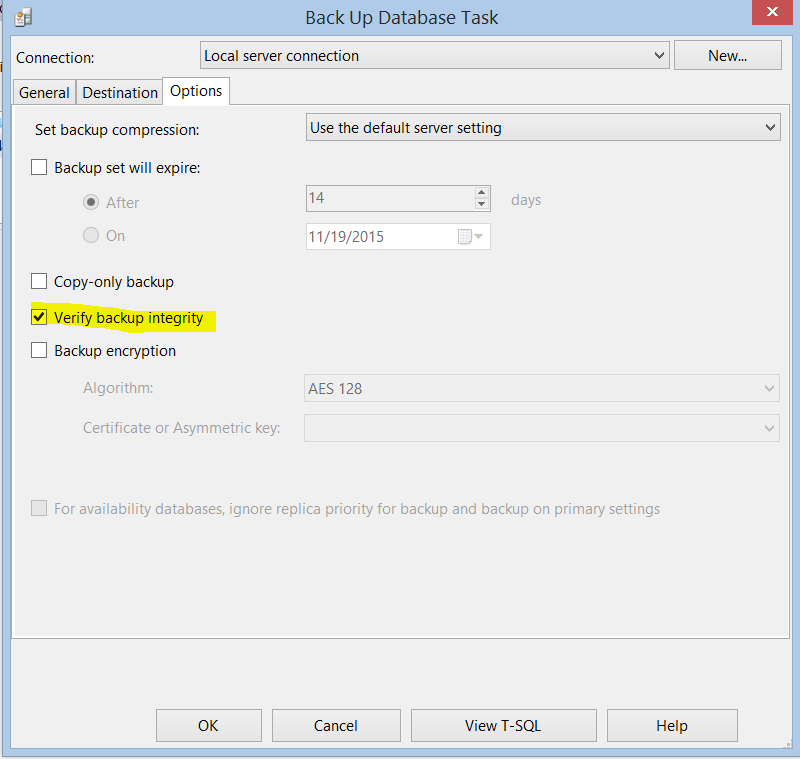
Backup Methods
Native SQL Backups
Native backups are built into SQL Server, i.e. no further costs. SQL Server is expensive enough you shouldn’t have to spend more money to just backup your data. Native Backups (NBs) have been around since at least SQL 2000, that’s the beginning of my SQL experience. NBs functionality has grown up right along with SQL. The ability to write to network shares, ability to compress, ability to verify are all options that make NBs an excellent choice.
If your SQL Server is experiencing CPU pressure, you may want to reconsider using compression. The compression is actually done with CPU cycles before writing the data to a file; so using compression will increase your CPU usage during your backup window.
3rd Party Backup Tools
Prior to SQL Server 2008 R2, I could make an argument for using 3rd Party Tools because of the importance of saving space with backup compression. However, since 2008 R2, backup compression is an available feature in all but Express editions.
Some 3rd Party Tools, are nothing more than a windows service that manages backups. Some 3rd Party Tools are actually a windows service that will perform proprietary backups these are the ones that usually provide a variety compression levels to choose from.
If your SQL Server is experiencing CPU pressure, you may want to reconsider using compression. The compression is actually done with CPU cycles before writing the data to a file; so using compression will increase your CPU usage during your backup window.
Your choice of methods is completely up to you and your business requirements. I personally see no reason to spend more money on a product that another product already does. My method of choice is Native Backups.
Location of Backups
This is always a hotly contested arguments. Do I backup my files to a local drive, attached SAN drive, network share or cloud?
To start with, I think the majority of the SQL Community will agree that the faster you get the BAK and TRN files off of the SQL Server the better off you will be.
Using a network share as your backup folder destination is just as valid as using a local drive or an attached SAN drive or heaven forbid an attached external USB drive. Remember, the destination should not be the same drive that your MDF and/or LDF files are on.
The real point of the discussion of Location of Backups should not be where my backups should be stored; but what is the final resting place of those backups? Does my company have a plan to move the files off site to a secure location? Is that plan automatic or manual?
Once your daily backup routines are complete, there should be a process in place to archive these flat files off of the SAN and relocate them off site. I have seen everything from an external USB drive carried home to SAN replication to a completely different data center on the other side of the country. Either method is functional in getting the backups off site.
One very reasonable and possible location is cloud storage. This concept, if enough space is purchased, kills the preverbal “two birds with one stone”. It not only backups up your files off of the same drive as your live data but it also by its very nature ensures that the backups are indeed offsite.
My Personal Ideal Scenario
My personal opinion is to use native SQL Backup with Compression and write the files to a network share, preferably a different SAN/NAS than your data. This does two things: 1) compression reduces the size of the backup files going across the network and 2) physically writes the files off of your SQL server as fast as possible and allows your immediate backups to be stored on a different physical drive than your live data.
Some will argue and say “it will blow up my network”; however, with the current specs of modern NIC cards and routers, it is highly unlikely that you will cause network issues.
Offsite Archiving
The most difficult part of this planning is how to get the backup files offsite. Replicated SANs can be VERY expensive, archiving to Tape is an option, cloud storage is available as an option or just copying files to external drive. The thing to remember is the amount of time it takes you to get the files to their final resting place is the amount of time it takes to recover them (RTO).
I believe as cloud storage gets cheaper and cheaper (except for you Microsoft), the feasibility of backing up directly to the cloud will be more and more popular.
Bottom Line
Know your RPO/RTO of your company, have a plan to accomplish those goals and know how to make that happen in the cheapest, fastest, safest way possible.



 Padre's SQL Resort